- Home Page /
- Electronics /
- Computer Accessories /
- Computer Accessories & Peripherals /
- Input Devices /
- Graphics Tablets /
- HUION 420 OSU Tablet Drawing Tablet, Graphics...
0 ratings




Item #:
129010
HUION 420 OSU Tablet Drawing Tablet, Graphics Tablet with Digital Stylus, 4 x 2.23 inches Pen Tablet for Digital Art, Design & Animation, Work with
87% of respondents would recommend this to a friend
Item #:
129010
AUD 47
Price Details
Excluding Shipping & Custom charges ( Shipping and custom charges will be calculated on checkout )
*All items will import from US
0 ratings
Write a review
In stock
 Imported from USA store
QTY:
Order now and get it around Friday, June 26
Secured transaction
Ubuy works hard to protect your security and privacy. Our advanced payment security system ensures confidentiality by encrypting your information during transmission using AES (Advanced Encryption Standards) and SSL (Secure Socket Layer) protocols. Your payment details are 100% secure as we do not share your payment details with third party sellers.
Our Top Logistics Partners


Huion 420 graphics tablet is the perfect tool for kids and beginning artists to draw, sketch, and edit photos. It is easy to use, has a compact design, and compatible with various software and devices.

Fast
Shipping

Free
Return*

Secure Packaging

100% Original Products

PCI DSS Compliance

ISO 27001 Certified


Note: Step Down Voltage Transformer required for using electronics products of US store (110-120). Recommended power converters Buy Now.


What Stands Out
Compact Size
Measuring 4 x 2.23 inches, this tablet is highly portable, perfect for artists on the go, allowing users to create digital art anywhere without compromising space.
Precision Stylus
Includes a battery-free digital stylus that offers high sensitivity and accuracy, ensuring a natural drawing experience that replicates traditional methods effortlessly.
Universal Compatibility
Compatible with both Mac and PC, the HUION 420 easily integrates into existing workflows, making it ideal for a wide range of users across different platforms and applications.
Product Details
- Affordable and responsive graphics tablet for drawing and sketching
- Can replace computer mouse and keyboard for enhanced workflow
- Suitable for online education, remote working, and web conferences
- Compatible with various drawing software and mainstream applications
- Slim, compact, and lightweight design for easy portability
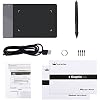
- Comes with pen, USB cable, spare pen nibs, and instructions
| Brand | HUION |
| Model Name | 420 |
| Built-In Media | Huion 420 Graphics Tablet, Pen Nibs x 4, Removal Tool,User Manual, USB Cord for the Tablet, Wireless Pen(with 2 programmable buttons, 1 AAA battery needed) |
| Target Audience | Student, Teacher, artist, beginner, desinger |
| Model Number | Huion 420 |
| Global Trade Identification Number | 00520324307390 |
| Manufacturer | ShenZhen Huion Animation Technology Co., LTD |
| UPC | 520324307390 760352094842 |
| Mfr Part Number | 420 |
| Item Type Name | drawing tablet |
| Connectivity Technology | USB |
| Pressure Sensitivity | 2048 Levels |
| Operating System | Mac OS 10.12 or later, Windows 7 & above |
| Additional Features | Extra-Slim |
| Specific Uses For Product | Drawing, Editing, Writing |
| Compatible Devices | Desktop, Laptop |
| Display Type | LCD |
| Native Resolution | 4000lpi |
| Screen Size | 5.6 Centimeters |
| Item Weight | 125 Grams |
| Item Dimensions L x W | 4.41"L x 6.97"W (11.2 cm) |
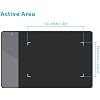
| Active Surface Area | 4 inches x 2.23 inches (10.2 cm) |
| Color | Black, White |
| Special Feature | Extra-Slim |
| Package Weight | 1 Pound |
What's in the box
Huion 420 Graphics Tablet
Wireless Pen(with 2 programmable buttons, 1 AAA battery needed)
USB Cord for the Tablet
Pen Nibs x 4
Removal Tool,User Manual
Who Should Buy?

-
Beginner Artists
Ideal for novice digital artists seeking an affordable tablet to practice digital drawing and enhance their skills.
-
Casual Users
Great for casual users interested in doodling, sketching, or note-taking without needing advanced features or complexity.
-
Students
Perfect for students in art programs or related fields who need a portable and easy-to-use drawing tablet.

-
Professional Artists
May not satisfy professional artists requiring advanced features, larger drawing areas, or higher sensitivity levels in their tablets.
-
Graphic Designers
Lacks advanced functionality and size needed for detailed graphic design work compared to more sophisticated tablets.
-
Gaming Enthusiasts
Not suitable for hardcore gamers seeking a highly responsive and feature-rich tablet designed for game development.
Product Description
Have any Query? Chat with us
Customer Questions & Answers
-
Question:
What is the size of the HUION 420 OSU Tablet?
Answer: The HUION 420 OSU Tablet features a compact size of 4 x 2.23 inches, making it highly portable and convenient for on-the-go artists and designers. This size is ideal for drawing, sketching, and various digital art applications, allowing for precision in smaller workspace settings. Whether you're at home or traveling, its lightweight design ensures that you can easily carry it in your backpack or laptop bag. -
Question:
Is the HUION 420 compatible with both Windows and Mac?
Answer: Yes, the HUION 420 OSU Tablet is compatible with both Windows and Mac operating systems. This compatibility allows users to seamlessly integrate the tablet into their existing workflows, regardless of their preferred OS. It supports a variety of software, from Adobe Photoshop and CorelDRAW to Paint Tool SAI, making it a versatile tool for both professional and amateur artists across different platforms. -
Question:
Does the HUION 420 come with a stylus?
Answer: Absolutely! The HUION 420 OSU Tablet includes a digital stylus specifically designed for precise input and a natural drawing experience. This stylus does not require batteries, ensuring a consistent performance without the worry of interruptions. The pressure sensitivity allows for varied line thickness based on how hard you press, making it ideal for detailed digital artwork, illustrations, and animations. -
Question:
What kind of art can I create with the HUION 420 OSU Tablet?
Answer: The HUION 420 OSU Tablet is versatile and well-suited for creating a wide variety of digital art forms—such as digital painting, graphic design, animation, and more. Many artists use this tablet for creating illustrations, comics, and even for retouching photos. The responsive stylus and customizable settings empower artists to explore their creativity with ease, making it a favorite among both beginners and experienced creators. -
Question:
How do I set up the HUION 420 OSU Tablet?
Answer: Setting up the HUION 420 OSU Tablet is straightforward. Simply download the appropriate drivers from the HUION website, install them on your computer, and connect the tablet via a USB port. Once the device is recognized, you can calibrate the settings to suit your preferences. This ease of setup lets you quickly start your creative projects without any hassle, whether you are using it for casual doodling or professional work. -
Question:
Can I customize the shortcuts on the HUION 420 OSU Tablet?
Answer: Yes, the HUION 420 OSU Tablet allows users to customize shortcut keys for enhanced efficiency. You can assign shortcuts for essential functions such as undo, redo, and brush select based on your workflow needs. This feature is especially beneficial for speed up your art/design processes and allows for quick access to tools, making it an excellent companion for artists who value productivity. -
Question:
Is the surface of the HUION 420 tablet suitable for all artists?
Answer: Yes, the surface of the HUION 420 tablet is designed to provide a comfortable drawing experience for artists of all skill levels. Its texture mimics paper, offering a tactile feel that many artists prefer. This surface helps improve control and allows for more natural hand movements while drawing, making it easier for artists to create intricate designs without straining their hands. -
Question:
Can children use the HUION 420 OSU Tablet for art projects?
Answer: Certainly! The HUION 420 OSU Tablet is an excellent tool for children interested in art and design. Its user-friendly design and affordable access make it ideal for young creators. Whether for school projects or personal expression, kids can explore digital drawing and enhance their artistic skills, all while having fun with their creativity in a safe and engaging way. -
Question:
What is the warranty policy for the HUION 420 OSU Tablet?
Answer: HUION typically offers a limited warranty for their products, including the 420 OSU Tablet, usually covering manufacturing defects for a designated period. Always check the specific warranty details provided by the manufacturer when purchasing. This warranty helps assure customers of the quality and durability of their purchase, which can be especially comforting for users making an investment in their digital art practice. -
Question:
Where can I buy the HUION 420 OSU Tablet in Nauru?
Answer: You can buy the HUION 420 OSU Tablet conveniently through Ubuy in Nauru. Ubuy offers a reliable shopping platform where you can find this graphics tablet along with various other electronic products. With options for delivery to your location, Ubuy makes it easy to order and enjoy your new digital drawing tablet without having to leave your home.
HUION Graphics Tablets Huion 420 Editorial Review


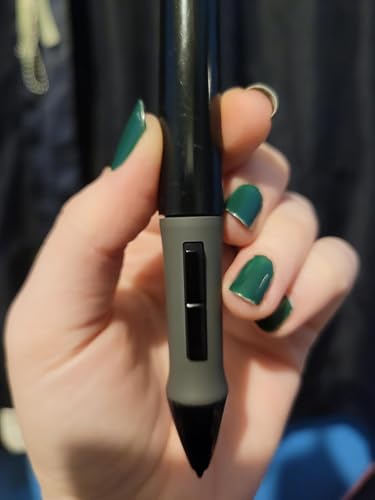

This drawing tablet appears to be quite versatile, with compatibility not just with PC and Mac but also with Linux. The pen includes replacement nibs and is easy to replace the battery. It works well with a number of drawing software, including Photoshop and Paint Tool SAI, and the tablet can be used for drawing and creating animations. It is also compatible with Power Point presenter mode. There have been some reported issues with installing the correct driver software, but customer service is available to help. The tablet only recognizes the pen that comes with the product but does allow for resting the hand on the tablet while drawing. The battery life is decent, lasting around two weeks of use.
Customer Reviews & Ratings
6912 customers ratings
-
5 Star
56%
-
4 Star
17%
-
3 Star
12%
-
2 Star
5%
-
1 Star
10%
Review this product
Share your thoughts with other customers
Pros
- Versatile compatibility with PC, Mac, and Linux
- Pen includes replacement nibs and easy to replace battery
- Works with popular drawing software and allows for animation creation
- Compatible with Power Point presenter mode
- Allows for resting hand on tablet while drawing
Product Price History
Important information
- Limitations : For products shipped internationally, please note that any manufacturer warranty may not be valid; manufacturer service options may not be available; product manuals, instructions, and safety warnings may not be in destination country languages; the products (and accompanying materials) may not be designed in accordance with destination country standards, specifications, and labeling requirements; and the products may not conform to destination country voltage and other electrical standards (requiring use of an adapter or converter if appropriate). The recipient is responsible for assuring that the product can be lawfully imported to the destination country. When ordering from Ubuy or its affiliates, the recipient is the importer of record and must comply with all laws and regulations of the destination country.
- Not all the products listed on Ubuy are for sale, as Ubuy is a global search engine. Products are subject to export/trade regulations.
AUD 47
Order now and get it around Friday, June 26
This item is not restrict in my country.(Please click on above link if this item is not restrict in your country, So our team will review and allow.)
QTY:
Secured transaction
Ubuy works hard to protect your security and privacy. Our advanced payment security system ensures confidentiality by encrypting your information during transmission using AES (Advanced Encryption Standards) and SSL (Secure Socket Layer) protocols. Your payment details are 100% secure as we do not share your payment details with third party sellers.
Our Top Logistics Partners
Fastest cross-border delivery
Features & Benefits
- Affordable graphics tablet with responsive stylus.
- Easy to setup and suitable for both left and right handed users.
- Perfect for limited desktop space and easy to carry out when on a trip.
- Can replace the computer mouse and keyboard.
- Compatible with most drawing software including Adobe Photoshop, paint tool sai, illustrator, corel draw, corel painter, sketchbook, manga studio, clip studio paint, and more.
- No need to install drivers. Just plug and play!