0 ratings


Item #:
76094050
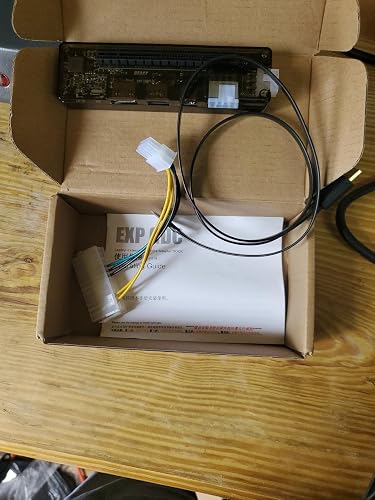
Laptop Gpu External Without 18105 Laptop External Independent Video Card Dock for Mini Pcie Without Power Supply
90% of respondents would recommend this to a friend
Item #:
76094050
AUD 147
Price Details
Excluding Shipping & Custom charges ( Shipping and custom charges will be calculated on checkout )
*All items will import from US
0 ratings
Write a review
In stock
 Imported from USA store
QTY:
Only 1 item left in stock.
Order now and get it around Saturday, September 12
Secured transaction
Ubuy works hard to protect your security and privacy. Our advanced payment security system ensures confidentiality by encrypting your information during transmission using AES (Advanced Encryption Standards) and SSL (Secure Socket Layer) protocols. Your payment details are 100% secure as we do not share your payment details with third party sellers.
Our Top Logistics Partners


Support dual TD compatible switch (hardware conflict resolution), multistage anti-interference circuit, and data line reinforcement.

Fast
Shipping

Free
Return*

Secure Packaging

100% Original Products

PCI DSS Compliance

ISO 27001 Certified



Note: Step Down Voltage Transformer required for using electronics products of US store (110-120). Recommended power converters Buy Now.


What Stands Out
Compact Design
Designed for portability, this external GPU dock fits easily alongside your laptop, offering enhanced graphics power without the bulk, making it perfect for on-the-go gamers and creative professionals.
Independent Functionality
Operates without an external power supply, ensuring easy plug-and-play functionality that increases convenience and versatility in various setups, ideal for users needing immediate graphical enhancements.
Mini PCIe Compatibility
Compatible with Mini PCIe slots, this dock enables users to leverage high-performing graphics cards, elevating their laptop's capabilities beyond standard integrated options.
Product Details
- Supports dual TD compatible switch for hardware conflict resolution
- Compatible with various PCl-E devices such as graphics card, sound card, and more
- 8P power output interface allows connection to 220W power supply and ATX cable with ATX desktop power
- Features multistage anti-interference circuit and data line reinforcement for high-quality performance
- Suitable for industrial applications like engineering measurement, data collection, server debugging, and GPU computing
- Multiple supported interfaces including 6Pin+ output, DC power, USB, and data line interfaces
| Hardware Interface | HDMI, USB |
| Compatible Devices | Laptop |
| Total Usb Ports | 2 |
| Number of Ports | 2 |
| Total Number of HDMI Ports | 1 |
| Wattage | 150 watts |
| Input Voltage | 12 volts |
| Item Weight | 3 g |
| Color | Black |
| Brand | Aatraay |
| Unit Count | 1 Count |
| Manufacturer | Aatraay |
| Item Type Name | Digital Picture Frames |
| Model Number | Aatraay1boryxktui |
| Mfr Part Number | Aatraay1boryxktui |
| Total USB Ports | 2 |
| Total HDMI Ports | 1 |
Who Should Buy?

-
Budget Gamers
Ideal for gamers seeking to enhance graphics without investing in a new laptop. Cost-effective solution.
-
Compact Setups
Perfect for users with limited space who need a portable external GPU without bulky power requirements.
-
Casual Users
Great for casual users who require occasional graphics enhancements for light gaming or graphic design on the go.

-
High-End Gamers
Not suitable for users needing top-tier performance, as it lacks power and advanced features for serious gaming.
Product Description
Have any Query? Chat with us
Customer Questions & Answers
-
Question:
What is a Laptop GPU External Dock and how does it work?
Answer: A Laptop GPU External Dock is a device that allows you to connect an external graphics card to your laptop through a Mini PCIe slot. It works by providing a dedicated interface for a GPU, which enhances the laptop's graphics performance significantly. This setup is ideal for users who engage in gaming, graphic design, or video editing, allowing them to run more demanding applications without having to upgrade the internal components of their laptop. -
Question:
What advantages does using an external graphics card provide?
Answer: Using an external graphics card can significantly enhance your laptop's visual capabilities, offering improved frame rates, higher resolution processing, and better overall graphics performance. This is especially useful for gamers, CAD users, and media professionals who require advanced processing power without needing to invest in a completely new system. Additionally, it helps keep your laptop light and portable since you can use the external GPU when needed. -
Question:
Is this external video card dock compatible with all laptops?
Answer: Compatibility mainly depends on your laptop's available Mini PCIe slot and the specific GPU you intend to use. It's essential to check your laptop's specifications to ensure it supports external graphics connections. While many modern laptops can work with these docks, older models might require specific configurations or may not be compatible at all. Always refer to your laptop's documentation and the specifications of the dock before making a decision. -
Question:
Do I need a separate power supply for the external GPU?
Answer: The specific model in question does not include a power supply, meaning you would need to use a compatible external power source for your graphics card. This is critical as most dedicated GPUs draw significant power to operate effectively. Some users may choose to upgrade their power supply to suit high-performance GPUs, ensuring stable performance during high-demand tasks like gaming or rendering. -
Question:
Can I use the laptop while the external GPU is connected?
Answer: Yes, you can use your laptop while the external GPU is connected. However, you may need to configure your display settings to ensure that applications utilize the external graphics card instead of the integrated one. This can be beneficial for performance-heavy tasks and provides a seamless experience in multitasking scenarios where you can run games or graphic-intensive software while handling other applications. -
Question:
What types of graphics cards are compatible with this dock?
Answer: The dock is compatible with a range of graphics cards, but it's essential to verify the specifications of both the dock and the GPU for compatibility. Generally, standard desktop GPUs from manufacturers like NVIDIA and AMD can work well, provided they fit the dock's specifications regarding size and power requirements. Users often choose cards like the NVIDIA GeForce GTX series or AMD Radeon series for superior performance. -
Question:
How do I install and set up the external graphics card?
Answer: To set up your external graphics card, start by ensuring your laptop is off. Connect the dock to your Mini PCIe slot, install the graphics card into the dock, and connect any necessary power sources. Finally, power on your laptop and install any required drivers for the GPU. Following these steps allows you to easily transition between integrated and external graphics, optimizing performance according to your needs. -
Question:
What are some ideal use cases for an external GPU dock?
Answer: Ideal use cases for an external GPU dock include gaming on a laptop that lacks powerful internal graphics, video editing for professionals requiring high rendering speeds, and design work in CAD software that demands precise graphical output. These scenarios benefit from the enhanced visual capabilities and processing power offered by a dedicated external graphics card, allowing users to create and enjoy richer content. -
Question:
What are the limitations of using an external graphics card with a laptop?
Answer: Limitations include potential compatibility issues with certain laptops and performance constraints due to the bandwidth of the Mini PCIe connection compared to dedicated PCI Express slots found in desktops. Users might also experience heat management challenges, as external GPUs can run hot during extensive usage. Therefore, while the performance boost is significant, it is essential to understand these limitations when considering the upgrade. -
Question:
Where can I buy a Laptop GPU External dock without power supply in Nauru?
Answer: You can purchase a Laptop GPU External dock without a power supply through Ubuy, which offers a wide range of tech products, including this specific item. Ubuy provides easy access to various brands and models, ensuring you find the right dock to meet your needs. Additionally, Ubuy is recognized for its reliable service and user-friendly interface, making your shopping experience straightforward and efficient.
Aatraay Docking Stations Aatraay1boryxktui Editorial Review




No editorial reviews found
Customer Reviews & Ratings
7 customers ratings
-
5 Star
61%
-
4 Star
0%
-
3 Star
21%
-
2 Star
18%
-
1 Star
0%
Review this product
Share your thoughts with other customers
Pros
- Enhanced graphics performance
- Lightweight and portable
- Easy installation process
- Compatible with various laptops
- Versatile for gaming and design
Platform Trust & Buyer Confidence

MA
Mohammad
Verified buyer
“Excellent quality and original too,when ubuy send original things I will appreciate that ,I very satisfied thank you”
23 July 2026 · via Trustpilot
CK
Chitra
Verified buyer
“The order and delivery progress was communicated very well. Package arrived within the estimated time. Products arrived as expected in good condition.”
22-Jul-26 · via Trustpilot
K
kund
Verified buyer
“Good supply of products. Safe payment methods, and shipment worldwide! Genuine products.”
23-Jul-26 · via Trustpilot
OO
Onesi
Verified buyer
“Was my first time buying a product from Ubuy, but I found it so helpful. This is reliable. Gonna place a new order!”
22 July 2026 · via Trustpilot
SJ
SAO JOHN
Verified buyer
“Ubuy is a great online platform to buy stuff. Reliable, fast delivery time and great value for money. I've been using Ubuy online shopping platform for three years now and will continue to do so.”
23 July 2026 · via Trustpilot
Secure Checkout
Global Delivery
Easy Returns
Genuine Products
Product Price History
Important information
- Limitations : For products shipped internationally, please note that any manufacturer warranty may not be valid; manufacturer service options may not be available; product manuals, instructions, and safety warnings may not be in destination country languages; the products (and accompanying materials) may not be designed in accordance with destination country standards, specifications, and labeling requirements; and the products may not conform to destination country voltage and other electrical standards (requiring use of an adapter or converter if appropriate). The recipient is responsible for assuring that the product can be lawfully imported to the destination country. When ordering from Ubuy or its affiliates, the recipient is the importer of record and must comply with all laws and regulations of the destination country.
- Not all the products listed on Ubuy are for sale, as Ubuy is a global search engine. Products are subject to export/trade regulations.
AUD 147
Order now and get it around Saturday, September 12
This item is not restrict in my country.(Please click on above link if this item is not restrict in your country, So our team will review and allow.)
QTY:
Only 1 item left in stock.
Secured transaction
PCI DSS compliant and ISO 27001:2022 certified, with encrypted payments and full buyer protection on every order.
Our Top Logistics Partners
Fastest cross-border delivery
Features & Benefits
- Supports dual TD compatible switch (hardware conflict resolution)
- Multistage anti-interference circuit
- Data line reinforcement
- Compatible with graphics card, sound card, array card, video card, collect card, etc.
- 8p power output interface can connect 220W power supply and ATX cable with ATX desktop power
Ubuy Assurance
Experience worry-free shopping with 100% original products, PCI DSS-compliant payment security, ISO 27001-certified data protection, the fastest cross-border delivery, free returns *, and secure packaging on every order.