- Home Page /
- Books /
- Computers & Technology /
- Networking & Cloud Computing /
- Network Administration /
- Linux & UNIX Administration /
- Mastering Linux Administration: Take your sys...



Item #:
91232621
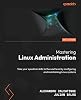
Mastering Linux Administration: Take your sysadmin skills to the next level by configuring and maintaining Linux systems
92% of respondents would recommend this to a friend
Item #:
91232621
AUD 109
Price Details
Excluding Shipping & Custom charges ( Shipping and custom charges will be calculated on checkout )
*All items will import from US
0 ratings
Write a review
In stock
 Imported from USA store
QTY:
Order now and get it around Monday, October 19
Secured transaction
Ubuy works hard to protect your security and privacy. Our advanced payment security system ensures confidentiality by encrypting your information during transmission using AES (Advanced Encryption Standards) and SSL (Secure Socket Layer) protocols. Your payment details are 100% secure as we do not share your payment details with third party sellers.
Our Top Logistics Partners


This comprehensive guide empowers you to master Linux, from installation to advanced security and cloud computing.

Fast
Shipping

Free
Return*

Secure Packaging

100% Original Products

PCI DSS Compliance

ISO 27001 Certified



Note: Step Down Voltage Transformer required for using electronics products of US store (110-120). Recommended power converters Buy Now.


What Stands Out
Advanced Skills Development
Elevate your systems administration expertise with in-depth techniques and strategies for effective Linux system management specifically designed for experienced users.
Comprehensive Content
The 2nd edition offers updated insights and practical examples that cover the latest Linux advancements, ensuring you have the most relevant knowledge for today's challenges.
Real-World Applications
Focus on practical scenarios and troubleshooting, making the learning experience applicable and directly relevant to real-world sysadmin responsibilities and tasks.
Product Details
- A one-stop Linux administration guide to developing advanced strategies for managing both on-premises and cloud environments while implementing the latest Linux updates in your data centerKey FeaturesLearn how to deploy Linux to the cloud with AWS and AzureFamiliarize yourself with Docker and Ansible for automation and Kubernetes for container managementBecome proficient in everyday Linux administration tasks by mastering the Linux command line and automation techniquesPurchase of the print or Kindle book includes a free PDF eBookBook DescriptionHarness the power of Linux in modern data center management, leveraging its unparalleled versatility for efficiently managing your workloads in on-premises and cloud environments. In this second edition, you'll find updates on the latest advancements in Linux administration including containerization, shell scripting, and hypervisors. Written by an experienced Linux trainer, this book will start you off with Linux installation on on-premises systems. As you progress, you’ll master the Linux command line, files, packages, and filesystems. You'll explore essential Linux commands and techniques to secure your Linux environment. New to this edition is a chapter on shell scripting, providing structured guidance on using shell programming for basic Linux automation. This book also delves into the world of containers, with two new chapters dedicated to Docker containers and hypervisors, including KVM virtual machines. Once adept with Linux containers, you'll learn about modern cloud technologies, managing and provisioning container workloads using Kubernetes, and automating system tasks using Ansible. Finally, you'll get to grips with deploying Linux to the cloud using AWS and Azure-specific tools. By the end of this Linux book, you'll have mastered everyday administrative tasks, seamlessly navigating workflows spanning from on-premises to the cloud. What you will learnDiscover how to create and use bash scripts to automate tasksNavigate containerized workflows efficiently using Docker and KubernetesDeploy Linux to the cloud using AWS and AzureAutomate your configuration management workloads with AnsibleFind out how Linux security works and how to configure SELinux, AppArmor, and Linux iptablesWork with virtual machines and containers and understand container orchestration with KubernetesExplore the most widely used commands for managing the Linux filesystem, network, security, and moreWho this book is forWhether you’re a new or seasoned Linux administrator seeking to understand modern concepts of Linux system administration, this book is a valuable resource packed with new and updated Linux insights. Windows System Administrators looking to extend their knowledge to the Linux OS will also benefit from this book’s latest edition. No prior knowledge is needed, all you need is a willingness to learn.Table of ContentsInstalling LinuxThe Linux Shell and FilesystemLinux Software ManagementManaging Users and GroupsWorking with Processes, Daemons, and SignalsWorking with Disks and FilesystemsNetworking with LinuxLinux Shell ScriptingSecuring LinuxDisaster Recovery, Diagnostics, and TroubleshootingWorking with Virtual MachinesManaging Containers with DockerConfiguring Linux ServersShort Introduction to Cloud ComputingDeploying to the Cloud with AWS and AzureDeploying Applications with KubernetesInfrastructure and Automation with Ansible
| Publisher | Packt Publishing |
| Publication date | March 22, 2024 |
| Edition | 2nd |
| Language | English |
| Print length | 764 pages |
| ISBN-10 | 1837630690 |
| ISBN-13 | 978-1837630691 |
| Item Weight | 2.84 pounds (1.29 kg) |
| Dimensions | 7.5 x 1.73 x 9.25 inches (19.1 x 4.4 x 23.5 cm) |
Who Should Buy?

-
Aspiring System Admins
Ideal for individuals looking to start or advance their careers in Linux system administration and IT support.
-
IT Students
Perfect for students studying information technology, offering practical knowledge and skills for handling Linux environments.
-
Current Sysadmins
Great for existing system administrators wanting to deepen their knowledge and learn advanced Linux management techniques.

-
Beginners
Not suitable for users completely new to Linux, as the content may be too advanced without prior knowledge.
Product Description
Have any Query? Chat with us
Customer Questions & Answers
-
Question:
How to Shop Mastering Linux Administration: Take your sysadmin Online From Ubuy?
Answer: It’s easy to shop Mastering Linux Administration: Take your sysadmin online from Ubuy. You just have to search for the product, choose your shipping method while checking out and get it delivered to your location. -
Question:
Is Mastering Linux Administration: Take your sysadmin Available to Shop Online in Nauru?
Answer: Yes, at Ubuy Nauru this product is available for you to shop at a reasonable price. The Mastering Linux Administration: Take your sysadmin is not available locally but you can trust us with our express shipping services. -
Question:
How Long Does It Take to Get Product After Placing the Order?
Answer: The delivery time of your ordered product varies as per what you've ordered and the shipping method that you've chosen. The estimated delivery time is mentioned during the checkout process, so be carefree while shopping.
Linux & UNIX Administration Editorial Review

**** "Mastering Linux Administration: Take Your Sysadmin Skills to the Next Level" by Alexandru Calcatinge is an impressive resource that comprehensively addresses the intricacies of Linux system administration. The book stands out for its well-structured layout and practical approach, making it an invaluable guide for readers eager to escalate their Linux skills. It presumes a basic understanding of Linux installations, providing a robust framework for both beginners and seasoned professionals to deepen their knowledge. Calcatinge excels in demystifying complex topics, including the Linux kernel and system services such as systemd and crontab, rendering them accessible while ensuring thorough coverage. Each chapter is logically sequenced, allowing readers to build upon their previous knowledge seamlessly. The clarity of the writing and the engaging tone make complex information digestible, fostering a strong learning experience. A highlight of the book is its hands-on exercises, which range from fundamental tasks to more intricate challenges like configuring secure web servers. These exercises not only reinforce theoretical concepts but also include troubleshooting scenarios that stimulate critical thinking—an essential skill for effective Linux administration. This practical focus is particularly beneficial in cultivating real-world skills, preparing readers for the demands they may face in their professional environments. In essence, "Mastering Linux Administration" is a quintessential tool for anyone serious about mastering the administration of Linux systems. Its straightforward yet comprehensive coverage positions it as an indispensable addition to any Linux administrator’s library, particularly timely given the industry's shift toward modern solutions like containers in cloud environments. **Pros and Cons:** **
Customer Reviews & Ratings
17 customers ratings
-
5 Star
93%
-
4 Star
7%
-
3 Star
0%
-
2 Star
0%
-
1 Star
0%
Review this product
Share your thoughts with other customers
Pros
- Well-organized and practical guidance.
- Clear, step-by-step explanations suitable for various skill levels.
- Comprehensive coverage of both basic and advanced topics.
- Hands-on exercises reinforce theoretical concepts and promote critical thinking.
- Engaging writing style without unnecessary fluff.
Cons
- Assumes prior knowledge of Linux OS installation.
Product Price History
Important information
- Limitations : For products shipped internationally, please note that any manufacturer warranty may not be valid; manufacturer service options may not be available; product manuals, instructions, and safety warnings may not be in destination country languages; the products (and accompanying materials) may not be designed in accordance with destination country standards, specifications, and labeling requirements; and the products may not conform to destination country voltage and other electrical standards (requiring use of an adapter or converter if appropriate). The recipient is responsible for assuring that the product can be lawfully imported to the destination country. When ordering from Ubuy or its affiliates, the recipient is the importer of record and must comply with all laws and regulations of the destination country.
- Not all the products listed on Ubuy are for sale, as Ubuy is a global search engine. Products are subject to export/trade regulations.
AUD 109
Order now and get it around Monday, October 19
This item is not restrict in my country.(Please click on above link if this item is not restrict in your country, So our team will review and allow.)
QTY:
Secured transaction
PCI DSS compliant and ISO 27001:2022 certified, with encrypted payments and full buyer protection on every order.
Our Top Logistics Partners
Fastest cross-border delivery
Features & Benefits
- Learn to install Linux on hardware and virtual machines.
- Master the command line and essential Linux commands.
- Manage software packages and user accounts effectively.
- Explore processes, signals, and service management.
- Automate tasks with shell scripting and enhance security.
- Gain skills in disaster recovery, virtualization, and container management.
Ubuy Assurance
Experience worry-free shopping with 100% original products, PCI DSS-compliant payment security, ISO 27001-certified data protection, the fastest cross-border delivery, free returns *, and secure packaging on every order.