- Home Page /
- Electronics /
- Computer Accessories /
- Tablet Replacement Parts /
- Screens /
- for Samsung Tab S9 FE Screen Replacement for ...
0 ratings




Item #:
127945999
for Samsung Tab S9 FE Screen Replacement for Samsung Galaxy Tab S9 FE 10.9" LCD Screen Replacement for Samsung SM-X510 Touch Screen Digitizer Display
Item #:
127945999
AUD 108
Price Details
Excluding Shipping & Custom charges ( Shipping and custom charges will be calculated on checkout )
*All items will import from US
0 ratings
Write a review
In stock
 Imported from USA store
QTY:
Only 4 items left in stock.
Order now and get it around Friday, August 07
Secured transaction
Ubuy works hard to protect your security and privacy. Our advanced payment security system ensures confidentiality by encrypting your information during transmission using AES (Advanced Encryption Standards) and SSL (Secure Socket Layer) protocols. Your payment details are 100% secure as we do not share your payment details with third party sellers.
Our Top Logistics Partners


High quality LCD display replacement for your Samsung Tab S9 FE, ensuring vibrant colors and crystal-clear visuals.

Fast
Shipping

Free
Return*

Secure Packaging

100% Original Products

PCI DSS Compliance

ISO 27001 Certified


Note: Step Down Voltage Transformer required for using electronics products of US store (110-120). Recommended power converters Buy Now.


Product Details
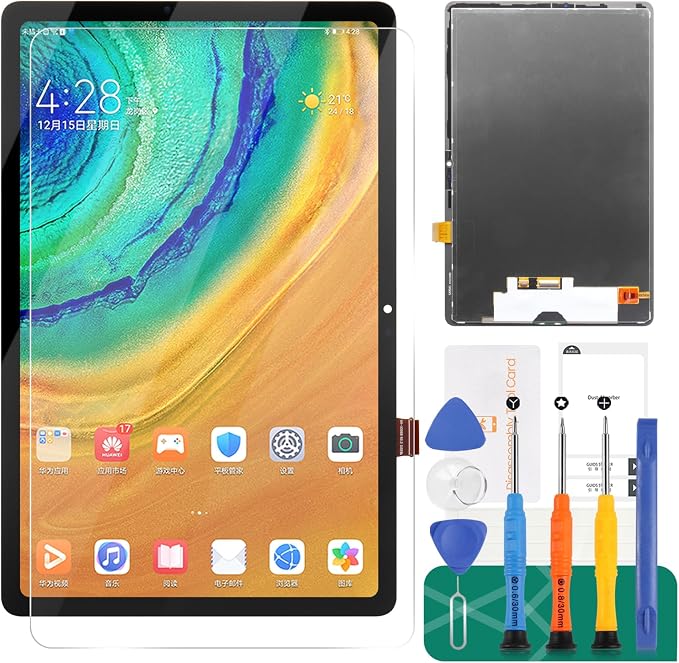
- 【Parameters】For Samsung Tab S9 FE SM-X510 SM-X516B LCD digitizer screen assembly replacement (Not for Tab S9 FE+), please confirm your phone model before purchasing.
- 【Quality Guarantee】All our products are strictly QC tested before shipment, 100% intact. Make sure there are no scratches, no dead zones, no dot pixels or lines on the screen. High color saturation, high resolution, wide color gamut and smooth hand feel.
- 【Application】Used to replace the defective LCD display touch screen digitizer assembly for Samsung Tab S9 FE. Examples include incorrect screen response, display issues, pixel distortion, cracked LCD screen, wrong colors, old or frozen LCD.
- 【Installation and Service】 Please test the screen before installation to ensure the normal use of the screen. Non-professional installation is not recommended. If you need help, please contact us and we will get back to you within 24 hours. (The screen does not include power buttons, volume buttons or other buttons. Please remove them from old screen, and then re-install.)
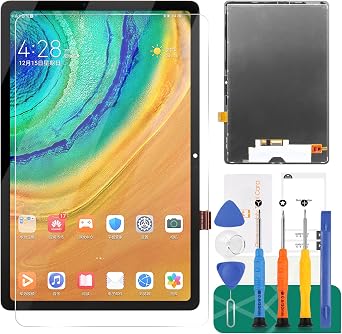
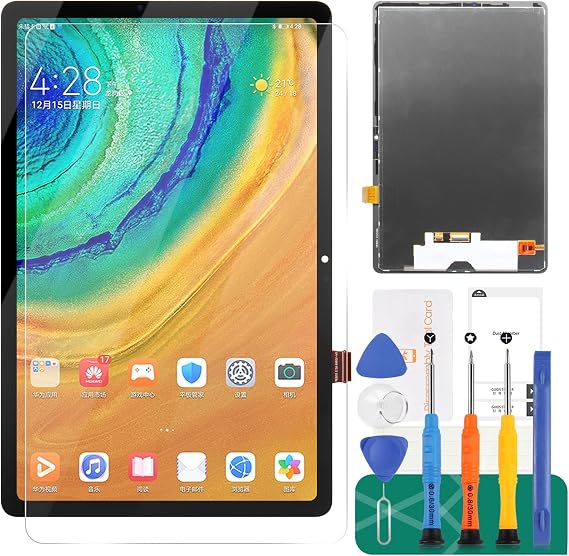
- 【With Repair Tools】A set of free repair tools, tape. (Our repaire tools is universal, you may also need other tools to repair the device if you want more professional.)
| Item model number | SM-X510, SM-X516B |
| Other display features | Wireless |
| Color | black |
| Whats in the box | screen replacement |
| Manufacturer | SRJTEK |
| Date First Available | May 30, 2024 |
| Item Weight | 0.5 lbs (230 grams) |
What's in the box
screen replacement
Product Description
Have any Query? Chat with us
Customer Questions & Answers
-
Question:
What is the compatibility of the Samsung Tab S9 FE Screen Replacement?
Answer: This screen replacement is specifically designed for the Samsung Galaxy Tab S9 FE, model SM-X510. This ensures a precise fit and interaction with your device, allowing all features to function smoothly after the replacement. When replacing a screen, using a compatible part is crucial as it avoids potential damage and ensures the touch sensitivity and display quality are preserved. -
Question:
How can I replace the screen on my Samsung Tab S9 FE?
Answer: Replacing the screen on your Samsung Tab S9 FE involves several steps: start by turning off the device, then carefully remove the back cover using a plastic opening tool. Disconnect the battery, remove the broken screen, and carefully install the new LCD screen. Following this, reconnect the battery and replace the back cover. Ensure you have the right tools and a steady hand to avoid damaging internal components; watching tutorial videos can provide valuable visual guidance as well. -
Question:
What tools do I need for the screen replacement?
Answer: To replace the screen, you will typically need a set of precision screwdrivers, a plastic opening tool, tweezers, and possibly a heat gun or hair dryer to soften adhesive. Each tool serves a specific purpose, like prying open the device or managing screws. Having the right tools not only makes the process smooth but also minimizes the risk of damaging your tablet during the repair. -
Question:
Is it safe to replace my screen myself?
Answer: Yes, many users successfully replace their own screens as long as they proceed with caution and follow a guide. However, if you're unfamiliar with electronics repairs, it's advisable to consult a professional. DIY repair can save you time and cost, but it requires a gentle touch and focused attention to avoid causing further issues. Think about your comfort level and skill set before proceeding. -
Question:
What should I do if my new screen doesn't display anything?
Answer: If your new screen doesn’t display, the issue could be due to a disconnected cable or compatibility problems. Begin by disassembling your tablet again, checking all connections to ensure everything is secure. Confirm that the replacement screen is indeed compatible with the SM-X510 model. In some cases, a soft reset might help recover functionality—consult your device manual for instructions on this. -
Question:
Will replacing the screen affect my tablet's performance?
Answer: Replacing the screen itself should not affect your tablet’s performance as long as you maintain the quality of components. A genuine or high-quality replacement screen will retain the original touch responsiveness and clarity of visuals. Ensure that during installation, no dust or debris enters the device, as this can cause performance issues. A smooth installation will ensure your tablet operates just as efficiently as before. -
Question:
What are the signs that I need to replace my screen?
Answer: Common signs include cracks or spiderweb patterns on the surface, unresponsive touch areas, black spots on the display, or flickering images. If these problems persist after a soft reset, it's likely time for a replacement. Addressing screen issues promptly helps avoid further damage and maintains the visual integrity of your device, ultimately enhancing your user experience. -
Question:
How much time does it take to replace the screen?
Answer: Typically, the entire process of replacing your Samsung Tab S9 FE screen can take anywhere from 30 minutes to a couple of hours, depending on your familiarity with the process. Experienced users may complete the task more quickly, while those new to repairs may take additional time to ensure caution. Setting aside uninterrupted time before starting can lead to a more thorough and successful replacement. -
Question:
Are there any risks involved in changing the screen?
Answer: Yes, common risks include damaging internal components or getting adhesive residue on the new screen. To mitigate these risks, follow guides closely, proceed slowly, and ensure you’re working in a clean and organized environment. Also, consider practicing on a non-essential device if this is your first repair attempt. Taking preventive measures reinforces a more secure and efficient repair experience. -
Question:
Where can I buy a Samsung Tab S9 FE Screen Replacement in Nauru?
Answer: You can purchase the Samsung Tab S9 FE Screen Replacement from Ubuy in Nauru. They offer a variety of quality replacement screens that are specifically designed for this model, ensuring compatibility and performance. Shopping on Ubuy ensures you have access to reliable parts, along with the convenience of a straightforward purchasing experience.
SRJTEK Screens SM-X510, SM-X516B Editorial Review
No editorial reviews found
Customer Reviews & Ratings
1 customers ratings
-
5 Star
100%
-
4 Star
0%
-
3 Star
0%
-
2 Star
0%
-
1 Star
0%
Review this product
Share your thoughts with other customers
Platform Trust & Buyer Confidence

MT
Mohd
Verified buyer
“The product received very good packaging & safe…Thank You”
16 June 2026 · via Trustpilot
SJ
Shawati
Verified buyer
“Accurate delivery timing given”
16 June 2026 · via Trustpilot
YB
Youcef
Verified buyer
“Not madly expensive like I thought, and much quicker than promised.”
15 June 2026 · via Trustpilot
LM
Leila
Verified buyer
“Never dealt with Ubuy before, but everything worked out great. Seamless cross border purchasing and shipping. Thanks!”
6/7/2026 · via Trustpilot
KA
Kwame
Verified buyer
“The process was smooth, with clear communication and timelines. This was my 1st purchase and I am really impressed. I will definitely be coming back.”
12 June 2026 · via Trustpilot
Secure Checkout
Global Delivery
Easy Returns
Genuine Products
Product Price History
Important information
- Limitations : For products shipped internationally, please note that any manufacturer warranty may not be valid; manufacturer service options may not be available; product manuals, instructions, and safety warnings may not be in destination country languages; the products (and accompanying materials) may not be designed in accordance with destination country standards, specifications, and labeling requirements; and the products may not conform to destination country voltage and other electrical standards (requiring use of an adapter or converter if appropriate). The recipient is responsible for assuring that the product can be lawfully imported to the destination country. When ordering from Ubuy or its affiliates, the recipient is the importer of record and must comply with all laws and regulations of the destination country.
- Not all the products listed on Ubuy are for sale, as Ubuy is a global search engine. Products are subject to export/trade regulations.
AUD 108
Order now and get it around Friday, August 07
This item is not restrict in my country.(Please click on above link if this item is not restrict in your country, So our team will review and allow.)
QTY:
Only 4 items left in stock.
Secured transaction
PCI DSS compliant and ISO 27001:2022 certified, with encrypted payments and full buyer protection on every order.
Our Top Logistics Partners
Fastest cross-border delivery
Features & Benefits
- High quality IPS LCD display for Samsung Tab S9 FE.
- Resolution of 1440 x 2304 pixels for exceptional clarity.
- Includes free double-sided adhesive tape and installation tools.
- Strict quality control ensures no defects or damages.
- Perfect for replacing cracked or malfunctioning screens.
- Non-professional installation is not recommended; seek help if needed.
Ubuy Assurance
Experience worry-free shopping with 100% original products, PCI DSS-compliant payment security, ISO 27001-certified data protection, the fastest cross-border delivery, free returns *, and secure packaging on every order.